

Support · Integrations · Canada & US
Indeed Apply API for Sincron HR
Activation, installation guide, and management for Canadian and US organizations.

Quick Summary
Canadian and US Sincron HR clients can activate the Indeed Apply API so candidates apply directly on Indeed.ca or Indeed.com. Sign the Indeed Apply API agreement with Sincron HR, request activation through the Sincron HR support portal and notify your Indeed representative. Sincron HR then activates the API in your HRIS and tests it with Indeed before go-live.
Table of Contents
What is Indeed Apply?
Indeed Apply is Indeed's built-in application process. Instead of being sent to an external careers page, candidates apply on Indeed from any device in a few taps, and their application lands in your Sincron HR recruitment module (ATS) pipeline.
Indeed is the world's #1 job site, with 665 million job seeker profiles and more than 3.5 million employers across 60+ countries, according to Indeed. Every external job you post in Sincron HR is sent to Indeed's free search results, subject to Indeed's quality standards, so you reach that audience without adding a new job board to your budget.
ATS Sync seamlessly transfers job and candidate data between Sincron HR and Indeed, reducing the need for manual data entry and ensuring compliance. ATS Sync integrations give you easy access to Indeed's tools with a simplified candidate experience that, according to Indeed, helps deliver up to 5 times more completed applications.
You keep Sincron HR as your single source of truth. You create and update jobs in Sincron, Indeed displays them on Indeed.ca and Indeed.com, and every Indeed application is stored alongside candidates from your other sources.
Why Canadian and US employers use Indeed Apply with Sincron HR
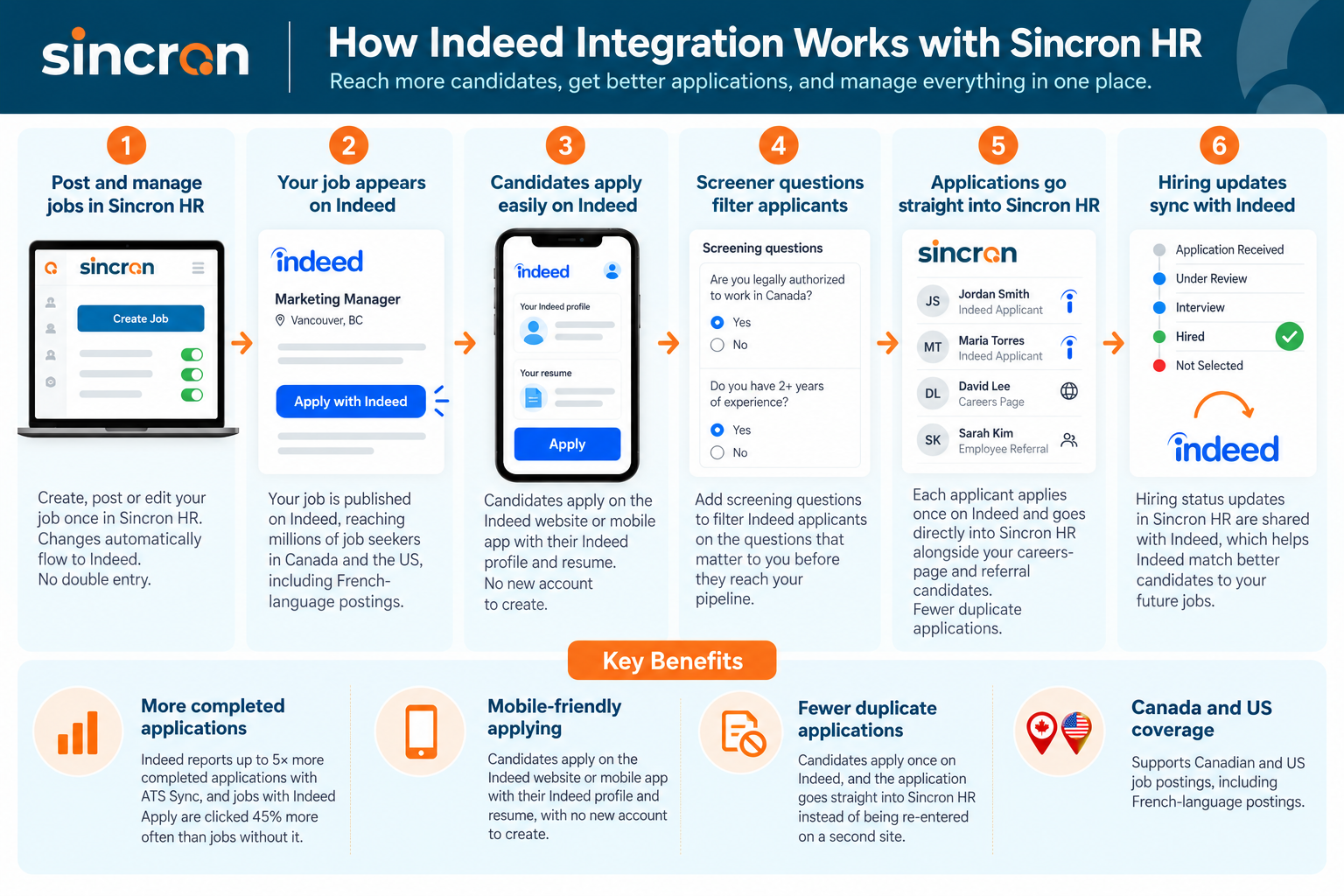
- More completed applications: Indeed reports up to 5 times more completed applications with ATS Sync, and jobs with Indeed Apply are clicked 45% more often than jobs without it.
- Mobile-friendly applying: candidates apply on the Indeed website or mobile app with their Indeed profile and resume, with no new account to create.
- Fewer duplicate applications: candidates apply once on Indeed, and the application goes straight into Sincron HR instead of being re-entered on a second site.
- Screener questions: filter Indeed applicants on the questions that matter to you before they reach your pipeline.
- Disposition Sync: hiring status updates in Sincron HR are shared with Indeed, which helps Indeed match better candidates to your future jobs.
- No double entry: post and edit jobs once in Sincron HR; changes flow to Indeed.
- One system of record: Indeed applicants appear in Sincron HR next to your careers-page and referral candidates.
- Canada and US coverage: supports Canadian and US job postings, including French-language postings.
Before you start
Have the following ready before you request activation:
- An active Sincron HR HRIS subscription that includes the Recruitment Module, for hiring in Canada, the US or both
- An Indeed employer account on Indeed.ca or Indeed.com
- The name and contact details of your Indeed representative
- A member of senior management with the authority to approve the Indeed Apply API connection
- A signed Indeed Apply API agreement with Sincron HR (request it through the Sincron HR support portal)
Tip: notify your Indeed representative at the same time you submit your activation request, so Indeed is ready to test the connection when Sincron HR reaches out.
How it works
You manage jobs in Sincron HR. Indeed displays them on Indeed.ca and Indeed.com, and every Indeed Apply application comes back to the same Sincron HR pipeline.
Sincron HR
You publish an external job, including its pay range and screener questions.
Indeed.ca and Indeed.com
The job goes live within 2 to 6 hours with the "Easily apply" label.
Candidate
Applies on Indeed with their Indeed profile and answers your screener questions.
Sincron HR recruitment pipeline
The application and screener answers arrive in Sincron HR, tagged with Indeed as the source.
Disposition Sync: as you move candidates through hiring stages in Sincron HR, their status is shared back to Indeed to improve future candidate matching.
You manage jobs in Sincron HR; Indeed displays them, and every Indeed Apply application returns to the same Sincron HR pipeline. Use this graphic on the page with the alt text: "Diagram showing jobs flowing from Sincron HR to Indeed and applications flowing back into Sincron HR."
Installing and activating Indeed Apply
Sincron HR activates Indeed Apply for you. Your team completes Steps 1 to 3, then Sincron HR and Indeed test the connection before it goes live.
Step 1: Sign the Indeed Apply API agreement
Who: a member of your senior management
Request the Indeed Apply API agreement through the Sincron HR support portal, then sign and return it. The request must come from senior management with the authority to approve the API connection.
Step 2: Request activation through the Sincron HR support portal
- Sign in to the Sincron HR support portal.
- Create a new ticket titled Indeed Apply activation request.
- Include your organization name and the email address linked to your Indeed employer account.
Step 3: Notify your Indeed representative
Let your Indeed representative know that you are activating the Sincron HR integration with Indeed Apply. This lets Indeed prepare for the connection test.
Step 4: Sincron HR activates and Indeed tests
Who: Sincron HR and Indeed
Your Sincron HR Consultant activates the Indeed Apply API in your Sincron HR HRIS and notifies Indeed to test the connection. The integration goes live once testing is complete, and you will be notified through your support ticket. Timing depends on Indeed and typically ranges from 1 week to 1 month.
Step 5: Confirm it is working
- Publish or update an external job in Sincron HR.
- Allow 2 to 6 hours for the post to go live, then search for the job on Indeed.ca or Indeed.com.
- Check that the job shows the Easily apply label.
- Confirm that new Indeed applications appear in Sincron HR under that job, with Indeed as the source.
Note: Indeed reviews every job it receives against its own quality standards and decides which jobs appear in free search results. A job that does not appear right away has not necessarily failed to sync.
Posting, editing and closing jobs
- Post: Create a job in Sincron HR and click publish when ready. It is sent to Indeed on the next sync.
- Edit: Update the title, description, location or pay range in Sincron HR. Indeed receives the change on the next sync. Do not edit synced jobs directly in Indeed, because the next sync will overwrite them.
- Close: Unpublish the job in Sincron HR and it is removed from Indeed.
- Pay transparency: Include a pay range in Sincron HR wherever the job's location requires it. In Canada, British Columbia, Prince Edward Island and Ontario (employers with 25 or more employees, since January 1, 2026) require pay information in public job postings. In the US, states such as California, Colorado, Illinois, New York and Washington do too. The pay range syncs to Indeed with each job, so your Indeed.ca and Indeed.com postings show the same range.
Reviewing Indeed applications
- Indeed applicants appear in Sincron HR under the job they applied to, with Indeed recorded as the source.
- Screener question answers are included with each Indeed application.
- Move candidates through your hiring stages in Sincron HR as usual. Disposition Sync shares these status changes with Indeed, which helps Indeed match better candidates to your future jobs.
Screener questions
-
Sincron HR supports Indeed screener questions, which filter applicants before they reach your pipeline. For example: "Are you legally entitled to work in Canada?" Set them up in Sincron HR under Recruitment > Screening & evaluation.
Sponsoring jobs on Indeed
-
Sponsoring is optional and is managed directly in your Indeed.ca or Indeed.com employer dashboard, not in Sincron HR. Sponsored job budgets are billed by Indeed. Contact your Indeed representative for sponsorship options.
What data syncs
Only the data below moves between Sincron HR and Indeed. Job details go out to Indeed.ca and Indeed.com; applications come back into Sincron HR.
| Direction | Data | Notes |
|---|---|---|
| Sincron HR → Indeed | Job postings | Title, description, location and pay range; Canadian and US jobs, including French-language postings |
| Sincron HR → Indeed | Screener questions | Shown to candidates when they apply |
| Sincron HR → Indeed | Candidate hiring status (Disposition Sync) | Statuses such as Under review, Interviewing and Hired; helps Indeed improve candidate matching |
| Indeed → Sincron HR | Indeed Apply applications | Tagged with Indeed as the source |
| Indeed → Sincron HR | Screener question answers | Included with each application |
Sync timing: changes in Sincron HR are sent to Indeed instantly. New and updated posts typically go live on Indeed within 2 to 6 hours.
Keeping candidate data secure
The integration shares only what it needs to run. Job postings and screener questions go to Indeed, applications and screener answers come back to Sincron HR, and hiring statuses are shared through Disposition Sync.
Indeed's security program is independently audited. The Indeed Trust Center lists the following for Indeed:
- SOC 2 Type 2: independent audit of data security, availability and confidentiality
- ISO/IEC 27001:2022: information security management
- ISO/IEC 27017 and 27018: cloud security and protection of personal data in the cloud
- ISO/IEC 27701: privacy information management
- Privacy laws: PIPEDA (Canada's federal private-sector privacy law), GDPR and CCPA
You can request Indeed's security documentation, such as its SOC 2 report, through the Indeed Trust Center.
Troubleshooting
Most Indeed Apply issues come from timing, Indeed's posting standards or a connection that isn't live yet. Find your problem below.
| Problem | Likely cause | What to do |
|---|---|---|
| Job is not showing on Indeed | New posts can take 2 to 6 hours to go live, or Indeed has not approved the job yet | Wait at least 6 hours and check the job meets Indeed's posting standards; contact your Indeed representative if it is still missing after a few business days |
| Job shows on Indeed without "Easily apply" | The integration is not live yet, or the job is internal-only | Check the job is marked published and check your activation ticket in the Sincron HR support portal |
| Similar jobs are missing | Indeed may hide near-duplicate titles or descriptions | Make each title and description distinct, or sponsor the job from your Indeed dashboard |
| Applications are not reaching Sincron HR | The integration is not live yet, or the connection was interrupted | Open a ticket in the Sincron HR support portal |
| Edits made in Indeed disappeared | Sincron HR overwrote them on the next sync | Make all job edits in Sincron HR |
| A candidate appears twice | They applied on Indeed and on your careers page | Review both records in Sincron HR and archive the duplicate |
Still stuck? Submit a ticket in the Sincron HR support portal for integration issues, or contact your Indeed representative for questions about your Indeed account or job approval.
Turning Indeed Apply off
- The Indeed Apply API can only be turned off by your Sincron HR Consultant.
- The request must come from a member of your senior management with the authority to turn off the API. Submit it through the Sincron HR support portal.
- Once turned off, your jobs stop syncing to Indeed. Applications you already received stay in Sincron HR.
- Let your Indeed representative know when the integration is turned off.