
HR Software for SMBs
HR Software for Small and Medium Businesses That Have Outgrown Spreadsheets
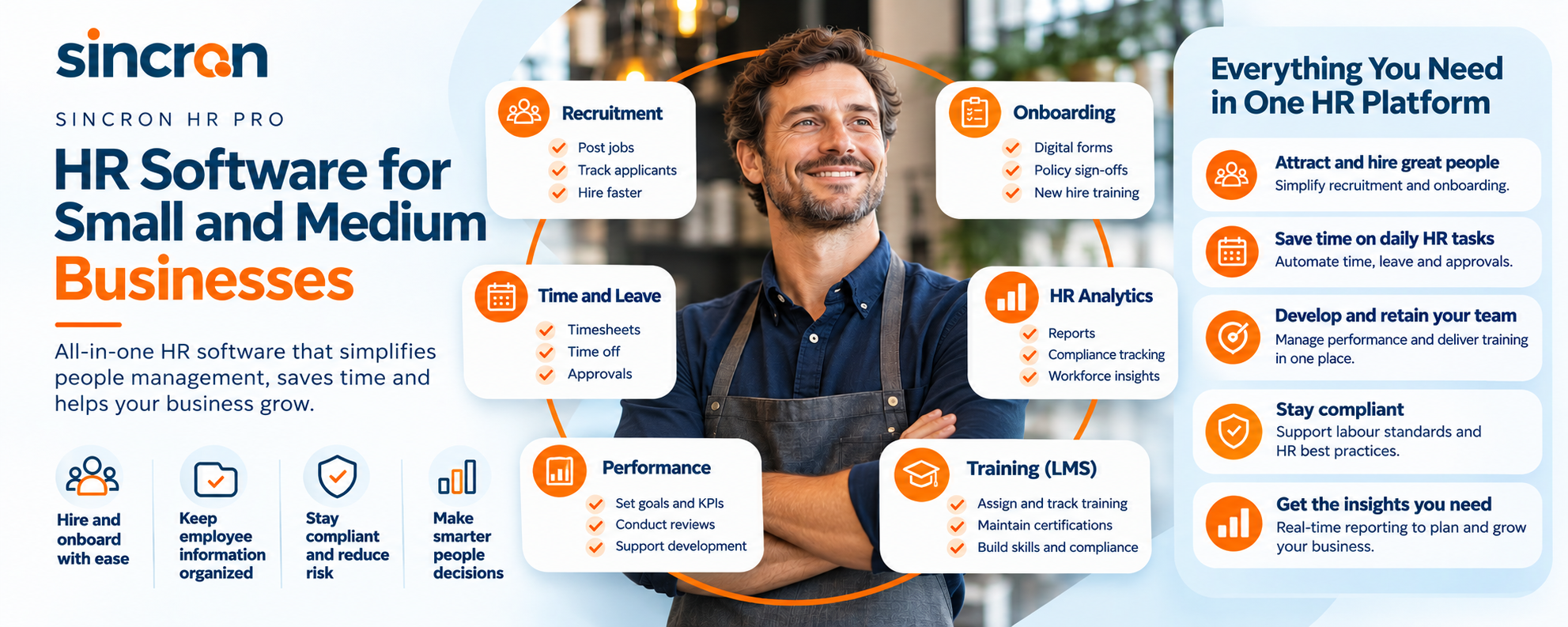
Sincron HR Pro is HR software for small and medium businesses with 30 to 1,000 employees. It brings hiring, onboarding, scheduling, time off, training and employee records into one system, set up for you by a dedicated consultant during a free 60-day trial. You keep your payroll provider, and there's no long-term contract.
Quick Summary
Sincron HR Pro is built for businesses with 30 to 1,000 employees whose HR still runs on spreadsheets, inboxes and one busy person. Work with a consultant to help set it up around your processes in a free 60-day trial and you only pay if you decide to go live.
Table of Contents
Is Sincron HR Pro a Good Fit for a Small or Medium Business?
Yes, if your business has between 30 and 1,000 employees and HR has grown faster than your systems. Most of the businesses we work with fall into one of two groups.
If you run the business
You're an owner, COO or operations lead with 30 to 300 people, often across sites, shifts or job sites. Employee information lives in several places, every manager onboards differently, and HR admin takes more of your week than it should. You want structure that keeps up with growth, without hiring a department to run it.
If you lead HR
You're the HR manager or People & Culture lead for 30 to 1,000 employees, in professional services, healthcare, legal, financial services or a similar field. You need consistent processes, clean records and reporting you can trust, and you need managers to actually use the system you choose.
What HR Problems Does Sincron HR Pro Solve for Growing Businesses?
It replaces the informal processes that worked at 15 people and break at 50. These are the problems we hear most:
- Records in five places: contracts, certifications and personnel files end up across email, shared drives and filing cabinets. Sincron HR Pro keeps them in one secure employee file, with expiry tracking for documents and certifications.
- Every manager onboards differently: new hires get a different first week depending on who hired them. Structured onboarding checklists and automated tasks give everyone the same start.
- Schedules and time off by text message: shift scheduling, a team availability calendar, timesheets with manager approvals and timebanks keep coverage visible.
- Training tracked from memory: safety tickets, licences and required courses are tracked with renewal alerts, so nothing lapses quietly.
- Hiring through an inbox: job postings, candidates and reference checks live in one applicant tracking system.
What's Included in Sincron HR Pro?
Every core module is included in the subscription, so you're not deciding which features you can afford.
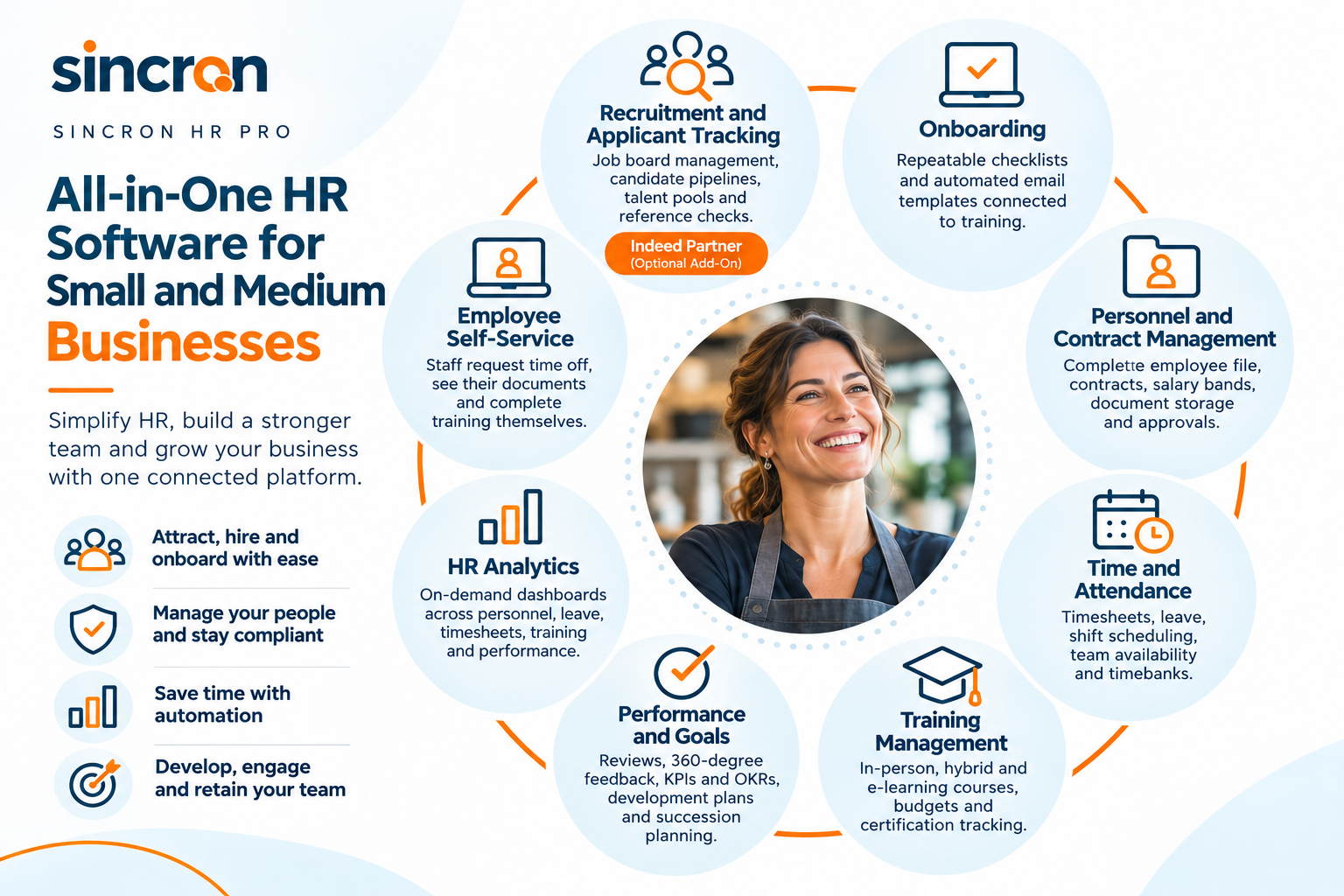
Sincron HR Pro works with Microsoft 365, including single sign-on, Outlook calendar and Teams. It runs in any web browser, including on a phone, so field and shift workers don't need to download an app; we show your team how to add it to their home screen.
H2: Do I Have to Change Payroll Providers
No. Sincron HR Pro doesn't process payroll. It sends employee, compensation and time data to the payroll system you already use, and your payroll provider keeps its compliance and tax-filing responsibilities. Our open API is optimized for for payroll systems like Sage 300 ERP and Sage X3, and can connect to other payroll systems. The payroll API is an optional add-on, configured at our hourly consulting rate.
Learn more about how Sincron HR Pro works with your existing payroll and our Sage 300 and Sage X3 integration.
How Does Implementation Work?
You don't start from a blank system, and you don't set it up alone. Every client starts from Sincron HR Pro's base configuration, and a dedicated implementation consultant tailors it to your business during a free 60-day Implementation Trial (FIT):
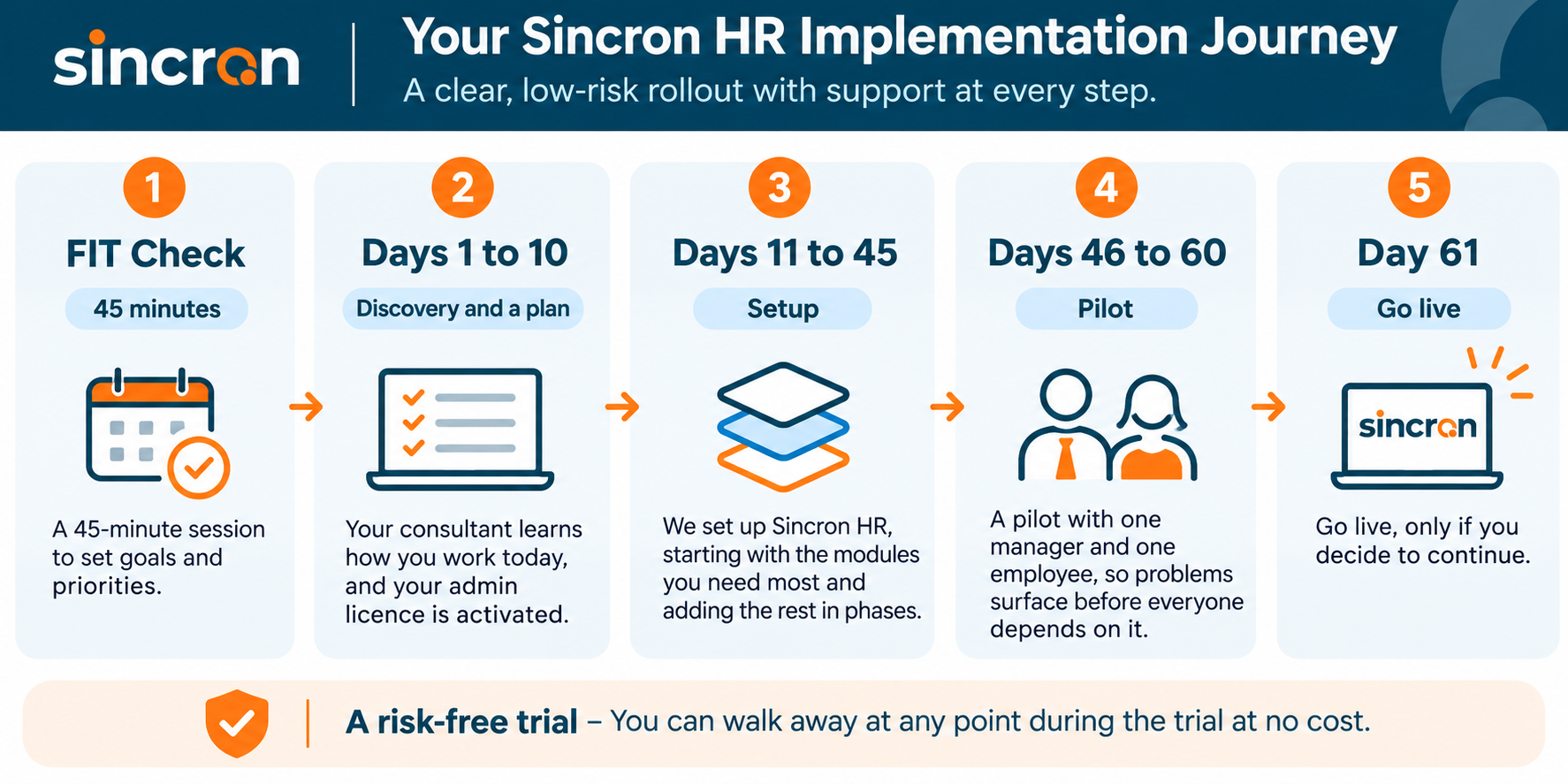
See the full phase-by-phase walkthrough of the free 60-day trial.
How Much Does HR Software for a Small Business Cost?
Sincron HR Pro's pricing is published, with no long-term contract.

What does Sincron HR Pro cost?
| What you get | Standard | Nonprofit rate Nonprofit CARF-accredited nonprofits and TechSoup members |
|---|---|---|
| Demo (40 to 45 minutes) | Free | Free |
| 60-day Implementation Trial (FIT) | Free | Free |
| Go Live, one-time | $1,799 | $899 50% off |
| Subscription (every core module, 5-user minimum) | $12.50 per user per month | $10 per user per month 20% off |
| Virtual HR (up to 20 staff, optional) | $500 per month | $500 per month |
| CARF accreditation guidance and consulting | Hourly consulting rate | Hourly consulting rate |
No long-term contract. Canadian organizations pay the same figures in CAD; US organizations pay in USD.
Start Your Free Implementation Trial (FIT)What If We Don't Have an HR Person Yet?
Many growing businesses don't, and that's fine. For teams of up to 20 staff, Virtual HR gives you hands-on support from Sincron's HR team for a flat $500 per month, and it can start during the free trial. As you grow past 20, we'll help you through the transition to your own part-time or full-time HR administrator, who inherits a system that's already set up.
Larger teams can bring in our consultants when they need them, at our hourly consulting rate: an HR audit and process design, policy and procedure development, or implementation consulting.
What Should I Ask Any HR Software Vendor?
Whichever system you consider, these questions show how much work and risk you're taking on.
| Question to ask | Why it matters | Sincron HR Pro's answer |
|---|---|---|
| Who sets the system up? | Without help, setup falls on one busy person | A dedicated consultant, during a free 60-day trial |
| Can we test it with our own people first? | A demo shows the software, not your processes | Yes. A pilot with a manager and an employee from Day 46 |
| What does it cost in year one? | Setup fees and add-ons add up quickly | Free trial, $1,799 to go live, then $12.50 per user per month |
| Are we locked into a contract? | Long contracts make a poor fit expensive | No long-term contract |
| Which modules cost extra? | Feature tiers hide the real price | Every core module is included; add-ons are optional |
For side-by-side comparisons, see our guides to the best HR software for SMBs in Canada and the best HR software for SMBs in the US, or compare Sincron HR Pro with Paycor and Workday.
Why Businesses Choose Sincron HR
Sincron HR has been building HR software since 2007, with 100+ implementations across the EU, Canada and the U.S. The platform is trusted by organizations from 30 to 10,000 employees, so it keeps working as you grow. It's built to support PIPEDA, HIPAA and GDPR data-protection requirements, and role-based permissions control who sees what. And because every implementation is led by a consultant, the system you go live with is one your managers have already used.
Frequently Asked Questions
What is the best HR software for a small or medium business?
The best fit depends on your size and how much setup help you need. Sincron HR Pro is built for businesses with 30 to 1,000 employees that want one system for hiring, onboarding, scheduling, time off and training, set up by a consultant and connected to the payroll they already use.
Is Sincron HR Pro too much for a business with 30 employees?
No. Sincron HR Pro is used by organizations from 30 to 10,000 employees, and implementation starts with only the workflows you need. Modules are added in phases as your team is ready.
Do we have to switch payroll providers to use Sincron HR Pro?
No. Sincron HR Pro doesn't process payroll. It sends employee, compensation and time data to the payroll system you already use, and your provider keeps its compliance and tax-filing responsibilities.
How long does it take to implement HR software?
With Sincron HR Pro, implementation happens during a free 60-day Implementation Trial led by a dedicated consultant, with go-live on Day 61 if you decide to continue. A pilot with one manager and one employee runs from Day 46.
How much does Sincron HR Pro cost for a small business?
The demo and the 60-day trial are free. If you go live, there's a one-time $1,799 Go Live fee, then $12.50 per user per month with a 5-user minimum and no long-term contract. Every core module is included.
Can field and shift workers use Sincron HR Pro on their phones?
Yes. Sincron HR Pro runs in any web browser, including on a phone, so there's no app to download. During onboarding, we show your team how to add it to their home screen.
What if we don't have an HR person?
For teams of up to 20 staff, Virtual HR gives you hands-on support from Sincron's HR team for a flat $500 per month. Larger teams can bring in our consultants for audits, policy work or HR consulting at our hourly rate.
Does Sincron HR Pro integrate with Microsoft 365 and Indeed?
Yes. Microsoft 365 single sign-on, Outlook calendar and Teams integration are included. Sincron HR is a global Indeed partner, and Indeed integration is available as an optional add-on.
Ready to Get Started?
See how Sincron HR Pro fits your organization's size, budget, and compliance needs. Schedule a free demo, or jump straight into a free 60-day Implementation Trial (FIT) and get hands-on with the platform before anything costs a dollar.