Quick Summary
Sincron HR Pro is the strongest overall choice for growing US SMBs that need recruiting, performance management, and compliance tracking in one platform with transparent pricing.
Gusto, Rippling, and BambooHR are each a better fit for a narrower need, small-budget payroll, a unified IT and HR login, or simple generalist HR at a flat per-employee rate.
Table of Contents
Quick Picks by Category
- Sincron HR Pro: best overall for a growing SMB that needs recruiting through performance management in one platform
- Sincron HR Pro: best for an SMB that wants one consultant relationship through implementation and beyond
- Gusto: best for a small, budget-first business that mainly needs payroll and basic HR
- Rippling: best for an SMB that wants HR, IT device management, and payroll under a single login
- Bamboo HR: best for simple, generalist HR at a predictable per-employee rate
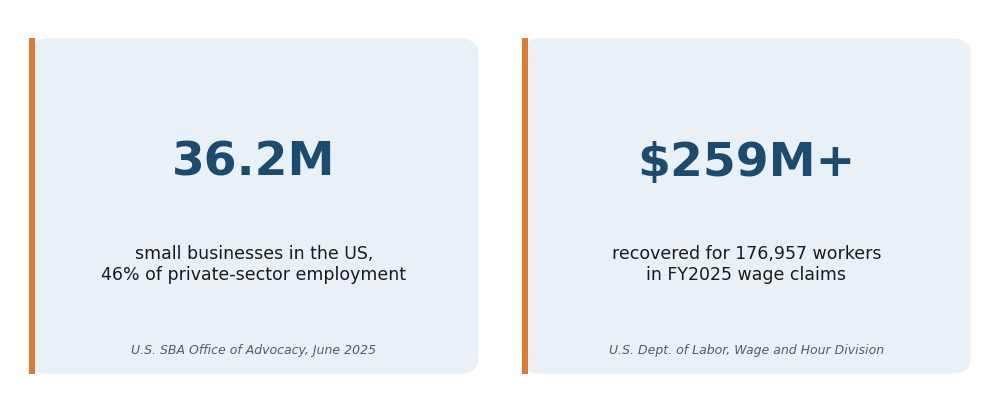
There are 36.2 million small businesses in the United States, and together they account for almost 46 percent of all private-sector employment [1]. Most of them started with a spreadsheet, a shared inbox, and a founder handling HR between everything else they're already doing.
That works fine at 8 employees. It stops working somewhere between 30 and 150, when onboarding paperwork starts slipping, performance reviews stop happening on schedule, and nobody can say with confidence whether a state-specific leave policy is being applied correctly.
The harder question isn't whether you need HR software at this point. The real question is which platform was built for a company your size, not a platform built for a 5,000-employee enterprise and stripped down, or a payroll tool with HR features bolted on as an afterthought.
Why This Decision Carries More Risk Than It Looks Like
Picking the wrong HR platform for your size costs more than a subscription fee. Nearly half of new HR technology implementations fail to deliver on their intended outcomes, according to Gartner and Sapient Insights Group survey data cited by SHRM [2], usually because the platform didn't match the buyer's actual size or workflow.
Wage and hour compliance mistakes are also more common, and more expensive, than most SMB owners assume. The U.S. Department of Labor's Wage and Hour Division recovered more than 259 million dollars in back wages for 176,957 workers in fiscal year 2025 alone [3], an average of 1,465 dollars per worker. Most of those cases trace back to recordkeeping and classification errors, exactly the kind of gap a spreadsheet-based HR process tends to produce.
What to Look for in HR Software for a US SMB
The three factors that matter most for an SMB choosing HR software are pricing transparency, how much of the employee lifecycle the platform covers, and how much support you get while you implement it.
Pricing transparency means seeing a real number before you talk to a salesperson. Several platforms built for this exact market advertise a low per-employee rate on their homepage, then move payroll, benefits administration, and reporting behind paid add-ons once you sit down to configure the account.
Lifecycle coverage means recruiting, onboarding, performance management, training, and time tracking living in one system instead of three. Every integration between separate tools is one more place data can go stale or someone forgets to update a record.
Implementation support matters most in the first 90 days. A platform that hands you a login and a knowledge base article treats implementation as your problem. A platform that assigns a consultant treats it as a shared one, which matters more the smaller your internal HR team is.
Best Overall for Growing SMBs: Sincron HR Pro
Sincron HR Pro is the strongest overall fit for a growing SMB because it covers the full employee lifecycle in one platform at a transparent, published price, instead of asking you to add modules one by one as your needs grow.
The platform includes recruitment and applicant tracking, personnel and contract management, compliance tracking, benefits and compensation tracking, digital onboarding and offboarding, performance management with 360-degree feedback and OKRs, training through a built-in learning hub, and Office 365 single sign-on. Sincron HR Pro has 100+ implementations across the EU, Canada, and USA since 2007, serving organizations from 30 to 10,000 employees.
Pricing starts with a free 60-day Implementation Trial that includes consultant-led setup, configuration, and a pilot with your team, with no cost to walk away. Going live is a one-time $1,799 fee, then $12.50 per user monthly, with a five-user minimum.
Best for an SMB That Wants One Consultant Relationship: Sincron HR Pro
An SMB that has outgrown spreadsheets needs guided rollout more than it needs another quote-only sales call. Sincron HR Pro assigns a dedicated consultant from the first day of the free 60-day trial through go-live and beyond, so the person who scoped your account is the same person helping you configure it.
That consistency matters because switching platforms is expensive in time, not just money. A rotating point of contact means re-explaining your setup every time a ticket gets reassigned, exactly the kind of friction a growing SMB with a lean HR team can least afford.
Best for a Small Business on a Tight Budget: Gusto
Gusto is the more affordable starting point for a small business that mainly needs payroll and basic HR before it needs full performance management or compliance tracking.
Pricing runs $6 to $22 per employee monthly across three tiers, plus a $49 to $180 monthly base fee [4]. Performance management is an add-on on the Simple and Plus tiers and only comes included on Premium, and mobile admin functionality is still listed as "coming soon" in Gusto's own materials [5].
Gusto is a reasonable choice if payroll is genuinely your main need today. It becomes a narrower fit once you need structured performance reviews, training tracking, or compliance reporting alongside payroll.
Best for a Unified HR, IT, and Payroll Platform: Rippling
Rippling is the strongest option for an SMB that wants HR, IT device management, and payroll under a single login and is comfortable with a year-long commitment before the full cost is clear.
The advertised rate starts at $8 per employee monthly, but most module pricing isn't published. Payroll, benefits administration, and IT and device management are each priced as separate add-ons [6], and customers are locked into a one-year contract with no early exit [7].
Rippling's breadth is real. So is the pricing opacity reviewers consistently flag, worth weighing against how much you value having HR, IT, and payroll under one login specifically.
Best for Simple, No-Frills HR: BambooHR
BambooHR is the strongest fit for a company that wants straightforward generalist HR without a long feature list to configure, at a flat, predictable per-employee rate.
The core plan is advertised around 10 dollars per employee monthly, aimed at companies from roughly 25 to 1,000 employees [8][9]. Payroll and benefits administration ship as separate paid add-ons, and reporting stays limited for deeper, cross-tabulated analysis once you need it [10].
BambooHR fits a company that wants HR to stay simple. It's a narrower fit once you need performance management with structured feedback cycles or training tracking built in, rather than bolted on.
Best HR Software for SMBs in the US, Compared
| Category | Sincron HR Pro | Gusto | Rippling | BambooHR |
|---|---|---|---|---|
| Built For | 30 to 10,000 employees | Small businesses, payroll-first buyers; no specific employee range publicly stated | SMB to mid-market; independent estimates range from under 350 to 1,000+ employees | Roughly 25 to 1,000 employees |
| Starting Price | $12.50/user/month after a free 60-day trial and one-time $1,799 Go Live fee (5-user minimum) | $6-$22/employee/month across three tiers, plus a $49-$180 monthly base fee | Advertised from $8/employee/month; most module pricing is not published | Advertised around $10/employee/month; payroll and benefits are separate paid add-ons |
| Full Employee-Lifecycle Coverage | Included: recruiting, onboarding, performance management with 360-degree feedback, training, time and attendance | Payroll-first; performance management is an add-on on Simple and Plus, included only on Premium | Broad HCM platform; payroll, benefits administration, and IT/device management are priced as separate add-on modules | Core HR included; payroll and benefits ship as separate add-ons, reporting stays limited for deeper analysis |
| Contract Commitment | Free 60-day trial, walk away at no cost; no long-term contract after go-live | Not publicly disclosed | One-year contract, no early exit | Not publicly disclosed |
If your SMB has outgrown a single payroll-first tool and needs recruiting, performance management, and compliance tracking in the same system your team already logs into, Sincron HR Pro's published pricing and dedicated consultant relationship are built for exactly that transition. If payroll alone is still your main need, or you specifically want IT device management bundled in, Gusto or Rippling are the more direct fit for that narrower job.
For more on how the pricing path works, see Sincron HR Pro's pricing page. If your organization is a nonprofit or social-service agency rather than a for-profit SMB, our companion guide to the best HR software for nonprofits in the US covers the compliance-specific side of this same decision.
Your Action Plan for Choosing HR Software
Work through these five steps before signing with any platform.
- Map your actual employee count trajectory. Don't buy for today's headcount if you're budgeting for 50 percent growth over the next two years, a platform priced per user gets expensive fast if it doesn't scale cleanly with you.
- List which of the five core HR functions you need now versus later. Recruiting, onboarding, performance management, training, and time tracking, mark each as "need now" or "need within a year."
- Request real pricing in writing, not a sales call. Ask specifically what's included at the advertised rate versus what's a paid add-on, and get it in an email you can reference later.
- Ask who handles implementation and how. A named consultant with scheduled check-ins is a different experience than a login and a help center link, ask which one you're getting before you sign.
- Confirm the real contract term. A one-year lock-in with no early exit is a different commitment than a trial you can walk away from, read this before you read the feature list.
Frequently Asked Questions
What is the average cost of HR software for a small or midsize business in the US?
It depends heavily on how many modules you need included at the base price. Sincron HR Pro publishes a free 60-day trial, a one-time $1,799 Go Live fee, and $12.50 per user monthly. Gusto runs $6 to $22 per employee plus a monthly base fee, and Rippling and BambooHR both advertise a low headline rate that rises once payroll and benefits add-ons are included.
Do I need separate payroll software if I choose an HRIS platform?
Not necessarily, but it depends on the platform. Sincron HR Pro doesn't process payroll directly, it flows data to your existing payroll provider. Gusto and Rippling both include native payroll, while BambooHR treats payroll as a separate paid add-on rather than a core feature.
How long does it take to implement HR software at a growing company?
A guided implementation with a dedicated consultant typically moves faster than a self-service setup, since someone is actively scoping your specific workflows instead of you working through documentation alone. Sincron HR Pro maps this out in the first 10 days of its free 60-day Implementation Trial, with go-live on Day 61.
What's the difference between an HRIS and a standalone payroll tool?
A standalone payroll tool calculates pay and files taxes. An HRIS covers the full employee lifecycle, recruiting, onboarding, performance management, training, and compliance tracking, with payroll either built in or connected to a separate provider.
Is a "free trial" for HR software genuinely free for SMBs?
Not always, so check the terms. Sincron HR Pro’s 60-day Implementation Trial is free and includes consultant-led setup, configuration, and a pilot, and you can walk away at any point at no cost; the one-time Go Live fee applies only if you decide to go live. Always confirm in writing whether another vendor’s free trial carries a setup fee or a required paid tier once it ends.
How many employees do I need before dedicated HR software makes sense?
There's no fixed number, but most companies feel the pain somewhere between 30 and 50 employees, when a founder or office manager can no longer track onboarding, compliance, and reviews manually without something slipping. Sincron HR Pro's published range starts at 30 employees for exactly this reason.
Choosing Software Built for Your Size, Not Scaled Down to It
For questions about the platform itself beyond this guide, Sincron HR Pro's full FAQ page covers implementation, pricing, and support in more depth.
The platforms compared here all work. The question isn't which one has the longest feature list, it's which one was built for a company at your stage, with pricing you can see before you commit and support that doesn't disappear after onboarding.
A platform decision like this outlasts whoever signs the contract.
References & Legal Citations
[1] U.S. Small Business Administration, Office of Advocacy: New Advocacy Report Shows the Number of Small Businesses in the U.S. Exceeds 36 Million. Published June 30, 2025. https://advocacy.sba.gov/2025/06/30/new-advocacy-report-shows-the-number-of-small-businesses-in-the-u-s-exceeds-36-million/
[2] SHRM, citing Gartner and Sapient Insights Group survey data: The Biggest Reason Why New HR Technology Implementations Fail. https://www.shrm.org/enterprise-solutions/insights/biggest-reason-why-new-hr-technology-implementations-fail
[3] U.S. Department of Labor, Wage and Hour Division: Fiscal Year 2025 Enforcement Data. https://www.dol.gov/agencies/whd/data
[4] Gusto: Pricing. https://gusto.com/product/pricing
[5] Gusto: The Gusto Mobile App. https://gusto.com/resources/articles/payroll/gusto-mobile-app
[6] Pin.com: Rippling Pricing Guide. https://www.pin.com/blog/rippling-pricing/
[7] Forbes Advisor: Rippling Pricing. https://www.forbes.com/advisor/business/software/rippling-pricing/
[8] BambooHR: Pricing. https://www.bamboohr.com/pricing/
[9] BambooHR: Medium-Sized Businesses. https://www.bamboohr.com/hr-solutions/medium-sized-businesses
[10] Outsail: How Much Does BambooHR Cost. https://www.outsail.co/post/how-much-does-bamboohr-cost
Ready to Get Started?
Schedule a free demo, or jump straight into a free 60-day Implementation Trial (FIT) and get hands-on with the platform before anything costs a dollar.